
7 Google Gemini Canvas Hacks, Transform Your Document Editing Now
Google Gemini Canvas revolutionizes how creators work with documents. This AI-powered workspace lets you draft, edit, and build in real time. Additionally, it turns ideas into apps, quizzes, and infographics effortlessly. In this post, discover 7 Google Gemini Canvas hacks that save time and elevate your editing game.
Table of Contents
- Why This Matters
- Top Google Gemini Canvas Hacks
- Secret Sauce for Success
- Get Started Now
Why This Matters
Google Gemini Canvas makes editing intuitive and collaborative. Therefore, users refine drafts without endless revisions. Moreover, it integrates seamlessly with Google tools for better workflows.
Top Google Gemini Canvas Hacks
Hack 1: Quick Draft Generation
Start with a simple prompt in Canvas. For example, type: “Draft a blog post on AI trends.” Gemini generates a full outline instantly. Edit sections live for perfect results.
Hack 2: Highlight and Refine Text
Select any text in your document. Gemini suggests edits, tone changes, or expansions. This hack speeds up polishing without regenerating everything. However, it keeps your voice intact.
Hack 3: Build Interactive Quizzes
Upload study notes to Canvas. Ask: “Turn this into an interactive quiz.” Gemini creates shareable quizzes with questions and answers. Perfect for training or learning.
Hack 4: Live Code Previews
Prompts for code shine in Canvas. Write HTML or Python, and see previews update in real time. Developers prototype apps faster this way. Additionally, fix errors on the spot.
Hack 5: Infographic Creator
Google Gemini Canvas excels at visuals. Input data, then say: “Make an infographic from this report.” It designs charts and layouts automatically. Export ready-to-use files easily.
Hack 6: Deep Research to Canvas
Run Deep Research first. Canvas turns reports into web pages or dashboards. For instance, analyze sales data into interactive trackers. This hack streamlines strategy sessions.
Hack 7: Audio Overviews and More
Generate audio summaries from long docs. Canvas also builds games or 3D models from prompts. Experiment with: “Create a solar system animation.” Fun and productive for creators.
For advanced tips, check Google’s Gemini Canvas Overview.
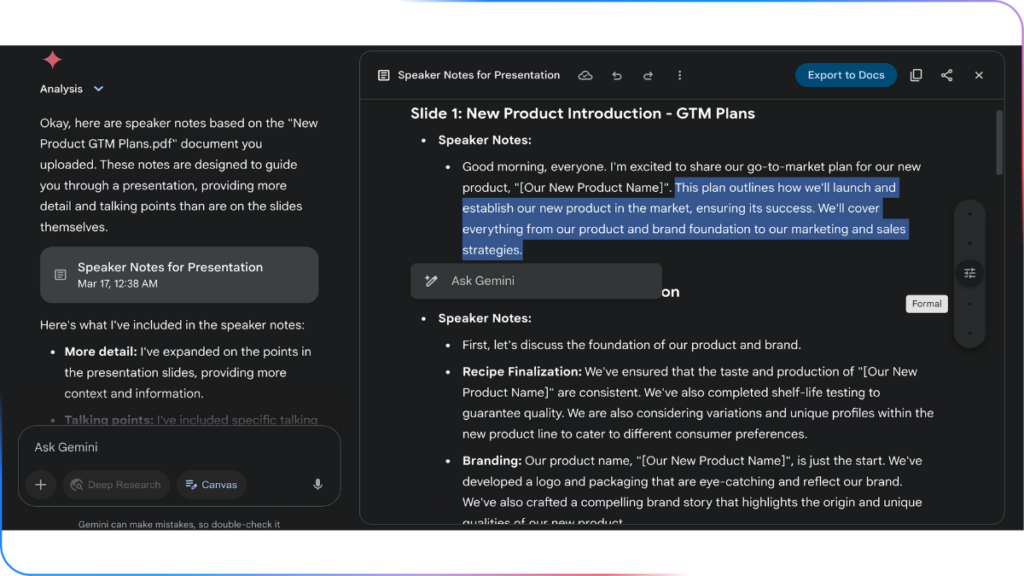
Google Gemini Canvas, Do magic with prompts
The secret lies in specific prompts. Always include context like audience or tone. Therefore, Gemini delivers precise outputs. Practice with small edits first, then scale to full projects.
Get Started Now
Google Gemini Canvas waits for you at gemini.google.com. Access it free and start prompting. Moreover, upgrade for Gemini 3’s advanced features. Transform your document editing today—your productivity awaits!
